Event Forwarding
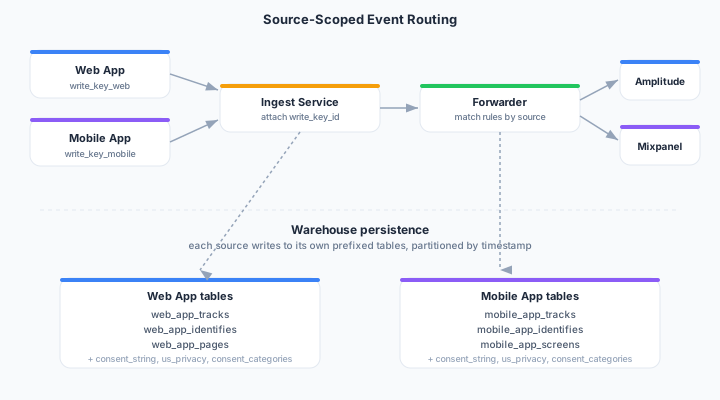
Route events in real-time to downstream analytics, marketing, and warehouse destinations. Each forwarding rule is scoped to a specific event source, so events from different apps can flow to different destinations without stepping on each other.
Overview
Event forwarding applies rules as events arrive. A rule matches when the event’s originating event source matches the rule’s configured source, and all of the rule’s filters and consent requirements are satisfied. Matching events are transformed (optionally), field-mapped, and delivered to the target destination.
Creating a Forwarding Rule
- Navigate to Streams > Forwarding
- Click Create Forwarding Rule
- Give the rule a name
- Select an event source — the rule only fires for events arriving on this source’s write key
- Choose a target — an HTTP/CAPI destination or a warehouse source
- Configure event filters:
- All events — Forward everything matching the source
- Specific events — Select event types or names to forward
- Condition-based — Forward events matching property conditions
- (Optional) Attach a JavaScript transformation
- Choose required consent categories
- Map event properties to destination fields
- Click Save
Why source scoping matters
Before source scoping, every forwarding rule applied to every event in the workspace — there was no way to route production events to one destination and development events to another, and no way to tell which app an event came from once it landed in a destination.
With source scoping you can:
- Isolate environments — production and development write keys forward to different destinations
- Route by app — a single workspace can run separate rule sets for Web, iOS, and Android sources
- Scope per partner — give each integration partner a dedicated write key and a rule set they can’t interfere with
- Trace provenance — every event carries
write_key_idend-to-end, so you can always identify the source
Configuration
| Field | Type | Required | Description |
|---|---|---|---|
name | string | Yes | Rule name |
event_key_id | string | Yes | The event source this rule applies to |
destination_id | string | Conditional | Target destination (HTTP/CAPI). Exactly one of destination_id or source_id must be set. |
source_id | string | Conditional | Target warehouse source for event persistence |
event_filter | object | No | Which events to forward (event types, event names, or condition tree) |
transformation_id | string | No | Optional reference to a JavaScript transformation |
field_mapping | array | No | Property name and path remappings |
consent_categories | array | No | Required consent categories (e.g., ["analytics", "marketing"]) |
config | object | No | Per-rule overrides: schema_name, custom_table_name, partition_column, staging_bucket |
rate_limit_per_sec | integer | No | Cap on events forwarded per second |
status | string | Yes | draft, active, paused, or error |
Consent Gate
When consent_categories is set, the forwarder checks the event’s context.consent before delivery. The event must have a true value for every required category; otherwise it is silently dropped (no delivery, no retry).
{
  "context": {
    "consent": {
      "analytics": true,
      "marketing": false,
      "advertising": false,
      "functional": true
    }
  }
}
An event with analytics: true but marketing: false will pass a rule requiring ["analytics"] but be dropped by a rule requiring ["analytics", "marketing"].
Delivery Monitoring
View delivery status for each forwarding rule:
- Open the forwarding rule detail page
- Check the Deliveries tab
- See success/failure counts, latency, and error details
Retry Logic
Failed deliveries are retried automatically:
- 5 retry attempts with exponential backoff (1s → 2s → 4s → 8s → 16s, capped at 30s)
- Dead letter queue for events that fail all retries
- Retries on 5xx and 429 responses; fails fast on other 4xx
Warehouse Forwarding
When the target is a warehouse source (BigQuery, Snowflake, Databricks, ClickHouse), events are batched, serialized to Avro, staged in Google Cloud Storage, and bulk-loaded into per-event-type tables. For ClickHouse, the load happens as direct batched HTTP INSERT statements rather than warehouse-side staged reads. See Events warehouse for table naming, partitioning, and consent column details.
API Reference
See Events API for endpoint details.
Next Steps
- Event sources — Create and manage write keys
- Browser SDK — Install the JavaScript SDK to emit events from the web
- Events warehouse — Inspect how events are stored
- Consent management — Configure consent categories