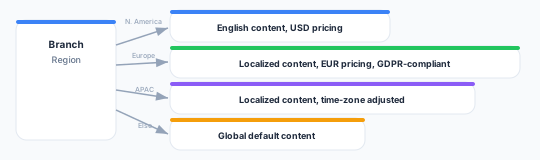
Branching
Zeotap orchestrations offer two tiles for sending members down different paths:
| Tile | Routes by | Use it for |
|---|---|---|
| Branch | Filter conditions (traits, attributes, events) | Personalizing the path by who the member is or what they’ve done |
| A/B Split | Percentage allocation | A/B tests and holdout groups |
They are separate tiles. Use Branch when the path should depend on member data; use A/B Split when it should depend on a percentage.
Branch — routing by condition
A Branch tile holds a list of branches. Each branch has a port name, a label, and a filter. When a member reaches the tile, the branches are evaluated top-to-bottom and the member takes the first branch whose filter matches.
No automatic “else”
A Branch tile does not create an else path for you. A member who matches none of the branches is not routed and stays at the tile.
To handle everyone, add a final catch-all branch with an empty filter (which matches all members) and place it last, so it only receives members that no earlier branch claimed.
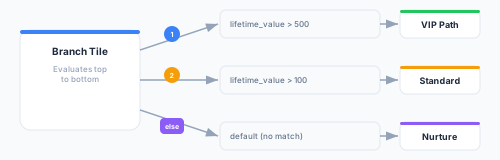
Example, evaluated in order:
- Branch 1 —
lifetime_value > 500→ VIP path - Branch 2 —
lifetime_value > 100→ Standard path - Branch 3 — empty filter (catch-all) → Nurture path
A member with lifetime_value = 300 matches Branch 2. A member with lifetime_value = 50 matches neither of the first two and falls through to the catch-all.
Branch filters
Each branch uses the same filter builder as audiences and traits, over the orchestration’s parent model. Conditions can reference model attributes and traits, and be combined with AND/OR groups.
Common property operators:
| Operator | Meaning | Example |
|---|---|---|
equals / not_equals | Exact match | plan = "enterprise" |
greater_than / less_than | Numeric comparison | lifetime_value > 500 |
contains / not_contains | Substring match | email contains "@company.com" |
starts_with | Prefix match | name starts_with "Dr." |
is_set / is_not_set | Value present / absent | phone is_set |
in / not_in | Value in a list | country in ["US", "CA", "UK"] |
Compound conditions
Combine conditions within a single branch using AND/OR, including nested groups:
Branch 1: (lifetime_value > 500) AND (country in ["US", "CA"])
Branch 2: (plan = "enterprise") OR ((lifetime_value > 1000) AND (tenure_months > 12))
Catch-all: (empty filter)
Time-based routing
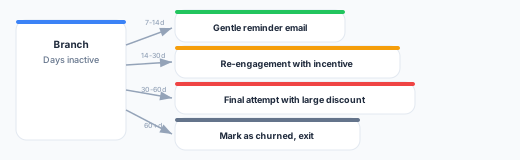
There is no dedicated time tile for branching. To route on timing, reference a time-based trait you’ve defined on the parent model (for example, days_since_signup or days_since_last_activity) in a branch filter, exactly like any other condition.
A/B Split — routing by percentage
An A/B Split tile divides members across two or more branches by percentage. Each branch has a label and a percentage, and the percentages must sum to 100% (use Even split to distribute them equally).
| Branch | Percentage | Use |
|---|---|---|
| Variant A | 80% | New email template |
| Variant B | 20% | Control (existing template) |
How assignment works
Assignment is deterministic, based on a hash of the member, the orchestration, and the specific A/B Split tile. This means:
- The same member always takes the same branch of that split — even after a pause/resume or a re-entry.
- Different A/B Split tiles assign independently: a member in Variant A of one split may be in Variant B of another.
Determinism protects test integrity — a member won’t receive both the test and the control treatment from the same split.
Keep the percentages at 100%. If they sum to less, members in the unallocated remainder are not routed.
A/B testing tips
- Include a control — Keep a holdout branch on the existing treatment for comparison.
- Label your exits — End each variant at its own Exit tile so per-path counts are easy to read in monitoring.
- Give it volume — Let enough members through each branch before drawing conclusions.
Multi-level branching
Chain Branch and A/B Split tiles to build decision trees — for example, split by percentage first, then branch each variant by member attributes.
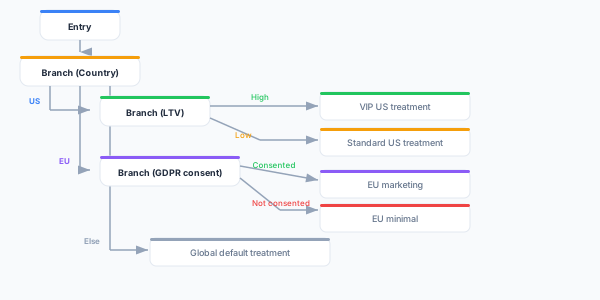
Deep nesting is harder to read and maintain, so prefer a single multi-way Branch or A/B Split over several stacked ones where you can.
Common patterns
Win-back with escalation
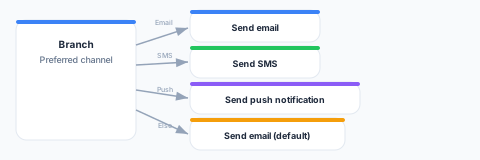
Channel preference routing
A Branch routes members to their preferred channel, with a catch-all branch (placed last) as the fallback.
Geographic personalization