Authentication
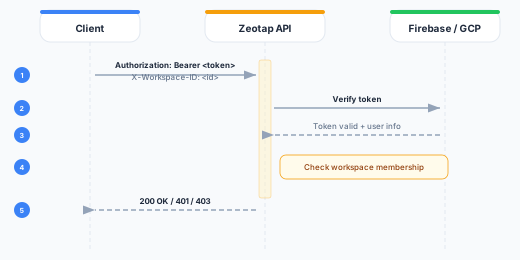
All Zeotap API requests require authentication via the Authorization header and workspace scoping via the X-Workspace-ID header.
Required Headers
Every API request must include:
Authorization: Bearer <token>
X-Workspace-ID: <workspace-id>| Header | Required | Description |
|---|---|---|
Authorization | Yes | Bearer token: a Firebase ID token (UI clients) or a REST API key (rk_...) |
X-Workspace-ID | Yes (for workspace-scoped endpoints) | UUID of the target workspace |
Content-Type | Yes (for POST/PUT) | Must be application/json |
Authentication Methods
1. Firebase ID Token (Browser/UI Clients)
Firebase ID tokens are used by the Zeotap web UI and any client-side applications that authenticate through Firebase/GCP Identity Platform.
How it works:
- The user signs in via Firebase Authentication (email/password, Google SSO, etc.)
- The Firebase client SDK returns an ID token
- The token is sent with each API request
curl -X GET https://composable.zeotap.com/api/v1/workspaces \
  -H "Authorization: Bearer eyJhbGciOiJSUzI1NiIs..." \
  -H "X-Workspace-ID: 550e8400-e29b-41d4-a716-446655440000"
Token lifecycle:
- Firebase ID tokens expire after 1 hour
- The Firebase client SDK automatically refreshes tokens before expiry
- On first use, Zeotap performs JIT (Just-In-Time) provisioning to create an internal account for the authenticated user
Token verification:
The Zeotap control plane verifies Firebase ID tokens using the Firebase Admin SDK. In development, you can configure the FIREBASE_AUTH_EMULATOR_HOST environment variable to use the Firebase Auth emulator.
2. REST API Keys (Server-to-Server)
REST API keys are long-lived credentials (prefix rk_) designed for server-to-server integrations, CI/CD pipelines, and automated workflows against the REST API.
How it works:
- Create a REST API key from REST API Keys in the Zeotap UI. When creating it, choose the permissions (scopes) the key may use.
- Store the key securely (it is only shown once at creation time)
- Use the key as a Bearer token in the
Authorizationheader, together withX-Workspace-ID
curl -X GET https://composable.zeotap.com/api/v1/workspaces/{id}/sources \
  -H "Authorization: Bearer rk_abc123..." \
  -H "X-Workspace-ID: 550e8400-e29b-41d4-a716-446655440000"
Key properties:
- A key is bound to a single workspace and is rejected on any other workspace
- A key acts as the user who created it, but is capped to the scopes selected at creation — its effective access is the intersection of your current permissions and the key’s scopes
- Keys are stored as secure hashes; the raw key is only returned at creation time
- Keys can be given an optional expiry, or left long-lived, and can be revoked at any time
- Each key shows a
key_prefixfor identification (e.g.,rk_abc1...)
See the REST API Keys reference for full details.
sk_-prefixed keys are a separate credential used only for the MCP server and the Stores API. They are not accepted on the REST API (/api/v1). Use a REST API key (rk_) for REST requests.
Workspace Scoping
Most API endpoints operate within the context of a workspace. The X-Workspace-ID header determines which workspace’s data is accessed.
Exceptions that do not require X-Workspace-ID:
GET /api/v1/workspaces— lists workspaces the authenticated user belongs toPOST /api/v1/workspaces— creates a new workspace- Organization-level endpoints under
/api/v1/organizations
Auth Flow Diagram
Error Responses
401 Unauthorized
Returned when the token is missing, expired, or invalid:
{
  "error": "not authenticated"
}
403 Forbidden
Returned when the token is valid but the user lacks access to the requested workspace or resource:
{
  "error": "permission denied"
}
Best Practices
- Never expose tokens in client-side code — Use REST API keys only in server-side environments.
- Rotate REST API keys regularly — Revoke old keys and generate new ones periodically.
- Use the minimum required scope — Grant a key only the permissions it needs, so a leaked key has the smallest possible blast radius.
- Handle token expiry gracefully — For Firebase tokens, implement automatic refresh. For REST API keys, handle 401 responses by alerting the administrator.
- Store REST API keys securely — Use environment variables or a secrets manager. Never commit keys to version control.