Governance
Governance in Zeotap provides the controls you need to manage who can access what data, where data can flow, and how your organization enforces compliance policies. It covers role-based access control, data flow restrictions, row-level data filtering, and multi-workspace management.
What Is Governance?
As your CDP usage grows — more team members, more destinations, more sensitive data — you need controls that go beyond simple authentication. Zeotap’s Governance features let you:
- Control access — Define who can see and modify which resources using roles and permissions
- Mask sensitive data — Set column-level sensitivity labels that control PII visibility in previews, suggestions, and syncs
- Restrict data flow — Set rules that prevent sensitive data from reaching unauthorized destinations
- Filter data visibility — Create access policies that automatically apply row-level filters based on user group membership
- Manage at scale — Organize multiple workspaces under a single organization with centralized member management
Governance Features
Role-Based Access Control (RBAC)
Zeotap provides a fine-grained permission system with three built-in roles and 42 permissions across 14 resource categories. Permissions are additive — a member’s effective permissions are the union of their role’s permissions.
- Owner — Full access to everything, including workspace management and billing
- Admin — Full access to all resources except workspace deletion and ownership transfer
- Member — Basic read and write access to operational resources (sources, models, syncs)
Learn more:
- RBAC Overview — How the permission model works
- Roles — Built-in role definitions and comparison
- Permissions — Complete permission reference (42 permissions, 14 categories)
- Groups — Organize members for easier management
- Managing Members — Invite, modify, and remove members
PII Masking
PII masking provides column-level sensitivity controls that determine how personal data is exposed across the platform. Mark columns as redacted (masked in UI, syncable), sync-only (hidden in UI, syncable), or blocked (hidden everywhere, not syncable). Includes automatic PII detection by column name patterns and SHA256 hash-on-sync for ad platform audience matching.
See PII Masking for configuration details.
Destination Policies
Destination policies control which data can sync to which destinations and under what conditions. Use them to:
- Block specific data from reaching certain destinations (e.g., prevent PII from syncing to advertising platforms)
- Transform data before it leaves the warehouse (e.g., hash email addresses before syncing to ad platforms)
- Rate limit sync frequency to specific destinations (e.g., limit syncs to a partner API to once per day)
See Destination Policies for configuration details.
Access Policies
Access Policies provide row-level access control. Define SQL filter conditions that automatically apply to all queries when a user belonging to a specific group accesses data. Use access policies to:
- Restrict regional teams to their own data (e.g., “EMEA only” access policy)
- Limit partner access to specific customer audiences
- Enforce data sovereignty requirements
See Access Policies for examples and configuration.
Organizations
Organizations let you manage multiple Zeotap workspaces under a single umbrella. Centralize member management, apply consistent governance policies, and maintain visibility across all workspaces from a single admin view.
See Organizations for setup instructions.
How Governance Fits into the Platform
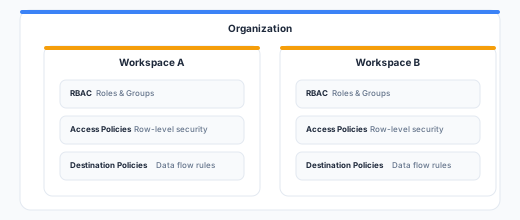
Governance features are workspace-scoped:
- RBAC (roles, permissions, groups) applies within a workspace
- Destination policies are defined per workspace
- Access Policies are defined per workspace and assigned to groups
- Organizations provide a cross-workspace management layer
API Reference
Govern resources are managed through the Zeotap REST API:
# Destination Policies
GET    /api/v1/destination-rules
POST   /api/v1/destination-rules
PUT    /api/v1/destination-rules/{id}
DELETE /api/v1/destination-rules/{id}

# Access Policies
GET    /api/v1/subsets
POST   /api/v1/subsets
PUT    /api/v1/subsets/{id}
DELETE /api/v1/subsets/{id}

# Groups
GET    /api/v1/groups
POST   /api/v1/groups
PUT    /api/v1/groups/{id}
DELETE /api/v1/groups/{id}

# Members
GET    /api/v1/members
POST   /api/v1/members/invite
PUT    /api/v1/members/{id}
DELETE /api/v1/members/{id}

# Organizations
GET    /api/v1/organizations
POST   /api/v1/organizations
PUT    /api/v1/organizations/{id}
See the API Reference for full request/response schemas.
Best Practices
- Start with least privilege — Assign the Member role by default and escalate to Admin or Owner only when needed.
- Use groups for team management — Instead of managing permissions per user, create groups that map to your team structure and assign access policies and roles at the group level.
- Layer destination policies early — Set up destination policies before connecting sensitive destinations. It’s easier to relax restrictions later than to discover sensitive data was already synced.
- Document your governance model — Keep a record of which groups exist, what access policies they have, and why. This helps with compliance audits and onboarding new team members.
- Review access regularly — Periodically audit member lists, role assignments, and destination policies to ensure they still reflect your organization’s needs.
Next Steps
- Set up RBAC for your workspace
- Create destination policies to control data flow
- Define access policies for row-level access control
- Create an organization for multi-workspace management