Zeotap on Snowflake Native App
Zeotap is available as a Snowflake Native App. Install it from the Snowflake Marketplace and the entire Zeotap CDP runs inside your own Snowflake account on Snowpark Container Services (SPCS) — control plane, event ingest, sync orchestrator, identity engine, and forwarder. You operate it through the same composable.zeotap.com UI as cloud customers, but the data stays put.
A note on
<APP_NAME>. When you install from the Marketplace, Snowflake asks you to pick a database name for the application. The Marketplace default for the Zeotap Composable CDP listing isZEOTAP_COMPOSABLE_CDP. Throughout these pages<APP_NAME>stands in for whatever name you chose — replace it with that value when copying SQL into a worksheet. The in-app Streamlit setup wizard renders every SQL block with the correct value already substituted; using the wizard is the recommended path. Identifiers prefixed withZEOTAP_(such asZEOTAP_PROXY_USER,ZEOTAP_ADMIN_WH,ZEOTAP_SF_EAI) are brand-scoped account-level objects created by the install script — they are NOT the application name and you should keep them exactly as written.
Why install the Native App
The Native App is built for teams whose compliance posture, billing preference, or data-residency rules push back against shipping customer data through a vendor cloud.
- Customer data never leaves your Snowflake account. Profiles, events, audience computations, identity graphs, and warehouse writes all happen inside SPCS in the region your Snowflake account runs in. Egress is limited to the External Access Integrations (EAIs) you explicitly approve for each destination family.
- Marketplace billing. Pay for Zeotap through Snowflake credits and the Marketplace billing channel rather than receiving a separate vendor invoice. SPCS compute and warehouse usage are charged on the credits you already buy from Snowflake.
- Zero infrastructure to operate. Zeotap ships the application package; Snowflake provisions the compute pool, mounts the block volumes, schedules the services, and exposes the public ingress endpoint. There is no Kubernetes to manage, no VPC to peer, no IAM roles to author beyond the consumer-side bootstrap.
- Data-residency follows your Snowflake region. The app runs wherever your account runs — AWS us-east-1, Azure West Europe, GCP asia-southeast1 — so residency is a property of your existing Snowflake contract, not a separate data-processing addendum.
- Same UI as the cloud product. Your team uses
composable.zeotap.comand signs in with email or Google. The browser only ever talks to the Zeotap cloud origin; the cloud forwards your requests to your in-account control plane through a reverse-proxy that authenticates with a keypair minted at install time.
How it fits together
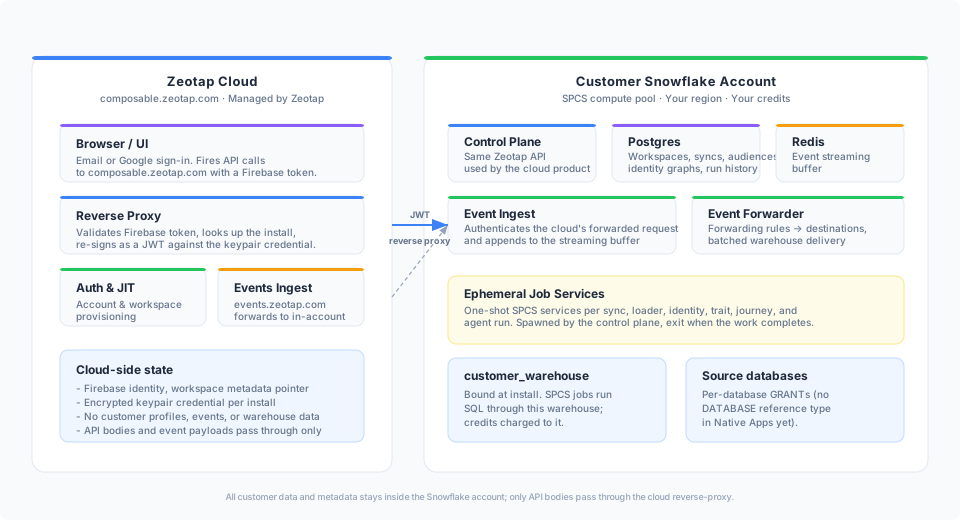
The cloud control plane on the left handles authentication, account/workspace provisioning, the events ingest endpoint, and a reverse-proxy that swaps short-lived UI tokens for the encrypted keypair credential bound to your install. Everything on the right — the long-running CDP services, the ephemeral job services that run sync, loader, identity, and orchestration work, and the application-owned warehouse Zeotap uses for SQL execution — lives inside your Snowflake account on SPCS.
The proxy chain is one-way: the browser talks to composable.zeotap.com, the cloud forwards through Snowflake’s SPCS public ingress, and the in-account control plane handles the request locally. Zeotap runs its SQL through ZEOTAP_ADMIN_WH, the warehouse the application creates and owns at install time (XSMALL by default; resizable from the setup app). The databases it reads from and writes to are configured per source and destination, and you grant access to each one explicitly.
What you’ll do to get started
Installing the Native App takes about five to ten minutes of operator time and a couple of minutes of SPCS warm-up.
- Install from Marketplace in Snowsight — Snowflake creates an Application object in your account from the Zeotap Application Package. The application requests three account-level privileges:
CREATE COMPUTE POOL,BIND SERVICE ENDPOINT, andCREATE WAREHOUSE. - Grant the two required EAIs from the application’s Configure tab —
zeotap_sf_api_access(outbound tocomposable.zeotap.com) andsendgrid_api_access. Snowsight reads the host allow-list from the application’s manifest and provisions each EAI for you; no SQL required. The application then auto-provisions its compute pool, its warehouse (ZEOTAP_ADMIN_WH), and the long-running SPCS services. - Run the proxy-identity SQL block as ACCOUNTADMIN. A single copy-paste block creates the proxy service user, the proxy role, and mints an RSA-2048 keypair inside the application (the private key never leaves Snowflake). This is the only consumer-side SQL the install requires.
- Open the Snowsight setup app (Apps →
<APP_NAME>→ Open) and click Register with Zeotap. The button enqueues a request that the in-account SPCS control-plane service picks up and uses to perform the cloud handshake through thezeotap_sf_api_accessEAI. The setup app then surfaces the one-time claim URL. - Visit the claim URL and sign in. Zeotap ties the install to your account and creates a default workspace. Destination EAIs are granted per-type on demand from the same Configure tab — or from the in-product destination wizard.
The full walkthrough — including the SQL template with explanatory comments, common pitfalls, and the destination EAI catalog — is in Installation.
Where to go next
- Architecture — the SPCS service inventory, the event hot path, and the proxy chain in detail.
- Installation — stage-by-stage walkthrough from Marketplace to active workspace.
- Auth Setup — why the proxy user/role exists, what
GENERATE_PROXY_KEYPAIRdoes, and how to rotate or harden the credential. - Sources — adding additional Snowflake databases as native-app sources, the GRANT script the UI generates, and why SELECT-only is enough.
- Destinations — the per-destination EAI mapping, the pre-bound catalog, and BYO-EAI for destinations outside the catalog.
- Troubleshooting — the errors operators hit most often during install and how to clear each one.
- FAQ — data-residency, pricing, upgrades, and uninstall questions.
If none of the Native App reasons apply to your team, the cloud-hosted Zeotap on composable.zeotap.com is the simpler default — see Getting Started for that path.