Relationships
The Relationships module in Zeotap provides a unified view of your customer data model. It lets you define entity types (such as Users, Accounts, and Products), map them to your warehouse data, and establish relationships between them — creating a semantic layer that powers identity resolution, audience building, and cross-entity activation.
What Is the Relationships Module?
While Models define how to extract data from your warehouse, the Relationships module defines what that data means. It answers questions like:
- What are the core entities in your business? (Users, Accounts, Products, Orders)
- Which model columns represent which entity attributes?
- How do entities relate to each other? (A User belongs to an Account; an Order contains Products)
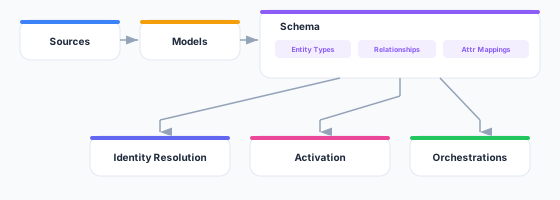
This semantic layer is used across the platform:
- Identity Resolution uses entity definitions to merge and unify profiles
- Audiences use relationships to build cross-entity activation lists
- Orchestrations use entity types to personalize messages with the right context
- Syncs use schema mappings to validate field compatibility
Key Concepts
Entity Types
An entity type represents a category of business object. Common entity types include:
| Entity Type | Description | Example Attributes |
|---|---|---|
| User | Individual end users or customers | email, name, phone, signup_date |
| Account | Organizations, companies, or households | company_name, industry, employee_count |
| Product | Items or services in your catalog | product_name, category, price, sku |
| Order | Transactions or purchases | order_id, total, status, created_at |
| Subscription | Recurring billing relationships | plan_name, status, renewal_date |
| Event | Actions or interactions | event_type, timestamp, properties |
You are not limited to these — you can create any entity type that matches your business domain.
Relationships
Relationships define how entity types connect to each other. For example:
- A User belongs to an Account (many-to-one)
- An Order is placed by a User (many-to-one)
- An Order contains Products (many-to-many)
- A User has Subscriptions (one-to-many)
Relationships enable cross-entity queries in Audiences (e.g., “Find all users whose account has more than 100 employees”) and power the ERD visualization.
Attribute Mapping
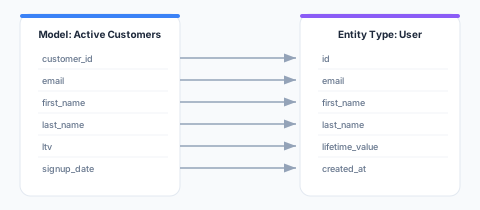
Each entity type’s attributes are mapped to columns from one or more models. This creates a clean, semantic layer on top of your raw model data:
How Relationships Fits into the Platform
Getting Started
1. Define Entity Types
Start by identifying the core entities in your business. Most organizations begin with:
- User — The primary entity representing individual customers or contacts
- Account — If you have B2B relationships or organizational groupings
See Entity Types for the full guide.
2. Map Attributes
For each entity type, map its attributes to columns from your models. This tells Zeotap which model columns correspond to which entity attributes.
3. Define Relationships
Connect entity types to each other. Relationships define the cardinality (one-to-one, one-to-many, many-to-many) and the join keys used to link entities.
See Relationships for the full guide.
4. Visualize
Use the ERD Visualization to see your entire data model as an interactive entity-relationship diagram.
API Reference
The Relationships module is managed through the Zeotap REST API. Every path below is workspace-scoped — {id} is your workspace ID. See Base URL for your instance’s API base URL and Authentication for the required Authorization and X-Workspace-ID headers.
An entity type is not a standalone resource: you assign one to a model, so entity types are managed through the model’s entity configuration rather than their own endpoints.
# List models (each carries its entity type and identifier configuration)
GET /api/v1/workspaces/{id}/models

# Get a single model
GET /api/v1/workspaces/{id}/models/{modelId}

# Set a model's entity type, primary identifier and attribute mapping
PUT /api/v1/workspaces/{id}/models/{modelId}/entity-config

# List relationships
GET /api/v1/workspaces/{id}/relationships

# Get a single relationship
GET /api/v1/workspaces/{id}/relationships/{relId}

# Create a relationship
POST /api/v1/workspaces/{id}/relationships

# Update a relationship
PUT /api/v1/workspaces/{id}/relationships/{relId}

# Delete a relationship
DELETE /api/v1/workspaces/{id}/relationships/{relId}

# List the relationships a single model participates in
GET /api/v1/workspaces/{id}/models/{modelId}/relationships
Best Practices
- Start simple — Begin with one or two entity types (User and Account) and expand as needed
- Use consistent naming — Adopt a naming convention for entity types and attributes (e.g., snake_case for attributes, PascalCase for entity type names)
- Map primary identifiers first — Ensure every entity type has a clear primary identifier (e.g.,
emailfor User,account_idfor Account) - Document relationships — Use descriptive relationship names that explain the connection (e.g., “User belongs to Account” rather than just “User-Account”)
- Review the ERD regularly — As your data model evolves, use the ERD visualization to verify relationships are correct and complete