Computed Attribute Evaluation
Computed attributes are computed on read. Zeotap does not pre-compute or store computed attribute values ahead of time — instead, each computed attribute is compiled to warehouse-native SQL and evaluated against your current warehouse data at the moment it is referenced: in an audience definition, an audience size estimate, a sync, or a journey. This page covers how on-read evaluation works, how dependencies are resolved for formula computed attributes, and the errors that can surface at compute time.
How Evaluation Works
A computed attribute is usable as soon as it is created and published — there is no separate “evaluate” or “run” step you have to perform first. When a computed attribute is referenced, Zeotap performs the following steps:
- SQL Generation — The computed attribute definition (SQL query, aggregation config, or formula expression) is compiled into a warehouse-native SQL statement, inlined into the larger query that referenced it (for example, the audience query).
- Query Execution — That SQL runs against your data warehouse through the configured warehouse connection, alongside the query that referenced the computed attribute.
- Result Use — The computed values flow directly into the result of the referencing operation — the audience match set, the estimated size, the rows selected for a sync, and so on.
The entire pipeline runs warehouse-native. No data is extracted from your warehouse during evaluation, and no values are copied into a separate table — the SQL runs inside your warehouse and the results are consumed in place.
Because values are computed on read, results always reflect the latest source data and the latest definition. There is no “last computed” value to wait on and no freshness to manage. If a downstream result — such as an audience size estimate — looks wrong, the thing to re-check is the computed attribute’s definition and configuration, not whether it has been evaluated recently.
Dependency Resolution
Computed attributes can depend on other computed attributes. The most common case is formula computed attributes that reference other computed attributes, but the dependency graph can also include computed attributes that feed into audience definitions.
When a formula computed attribute is evaluated, Zeotap resolves the dependency graph and computes the referenced computed attributes first, in topological order, as part of the same on-read computation:
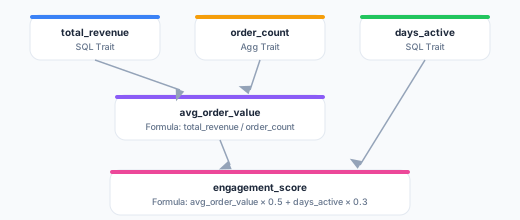
In this example, total_revenue and order_count are resolved first (they have no dependencies). Then avg_order_value is resolved (it depends on both). Then engagement_score is resolved last (it depends on avg_order_value and days_active). All of this happens within the single query that referenced engagement_score.
Circular Dependencies
Zeotap prevents circular dependencies at save time. If you attempt to create a formula computed attribute that would form a cycle (e.g., A depends on B, B depends on A), the save operation fails with a validation error.
Evaluation Errors
Because a computed attribute is compiled and run against your warehouse when it is referenced, errors surface at that point — for example, while estimating an audience size or running a sync. When evaluation fails, Zeotap surfaces:
- Error message — The error returned by the warehouse (e.g., SQL syntax error, permission denied, table not found)
- Failed SQL — The SQL that was executed, useful for debugging
Common failure causes:
| Cause | Resolution |
|---|---|
| Table or column not found | The source table was renamed or dropped. Update the computed attribute definition. |
| Permission denied | The warehouse credentials no longer have access. Check your warehouse configuration. |
| Query timeout | The query is too expensive. Optimize the SQL or increase your warehouse timeout. |
| Division by zero | A formula computed attribute divided by a computed attribute that returned zero. Add null/zero handling with IF or COALESCE. |
| Dependency failed | A computed attribute this formula depends on failed to evaluate. Fix the upstream computed attribute first. |
Manual Refresh (Optional)
Computed attributes do not require any manual action to be usable — they are always computed on read. As an optional convenience, you can still trigger a manual refresh:
- From the UI — Click the Evaluate Now button on the computed attribute detail page
- From the API —
POST /api/v1/workspaces/{id}/models/{modelId}/traits/{traitId}/evaluate
This is purely optional. A manual refresh does not change how or when computed attributes are evaluated elsewhere — every audience, estimate, sync, and journey still computes the attribute fresh against the warehouse whenever it is referenced.
Performance Considerations
- Query complexity — Complex SQL computed attributes with many joins or large table scans take longer and cost more each time they are referenced. Keep definitions efficient.
- Reuse in large queries — A computed attribute referenced many times in one audience query is resolved as part of that single query, so warehouse cost scales with how often and how broadly it is used.
- Warehouse sizing — If operations that reference computed attributes are consistently slow, consider scaling up your warehouse compute resources. Zeotap respects your warehouse’s resource limits.
Next Steps
- SQL Computed Attributes — Write custom SQL for computed attribute evaluation
- Aggregation Computed Attributes — Visual builder for common metrics
- Formula Computed Attributes — Combine computed attributes with expressions
- Audiences — Use computed attributes to build customer segments