Stores
A Store is a low-latency serving cache populated from your warehouse models. Use Stores when decisioning systems — web personalization, edge functions, ad bidders — need attribute lookups in milliseconds rather than warehouse round-trip times.
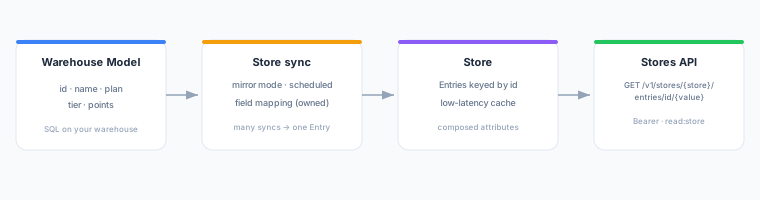
How Stores Work
- You define one or more Store syncs that map a model’s columns into a named Store, running in mirror mode on a schedule.
- Each sync run writes (or removes) the mapped fields for every row in the model into the Store, keyed by the row’s
idvalue. - Multiple syncs can compose a single Entry — each sync owns a disjoint set of fields.
- Your application queries the Stores API at
GET /v1/stores/{store}/entries/id/{value}to read the merged attribute set for any id in low-tens-milliseconds.
Prerequisites
- A configured warehouse and at least one Model with an
idcolumn. - A
read:storeAPI key (issued from the Store detail page).
Creating a Store
- Navigate to Stores in the left sidebar.
- Click New Store.
- Enter a Store name (lowercase letters, numbers, and hyphens only; must start with a letter).
- Click Create Store.
Adding a Store Sync
A Store sync connects a model to the Store and maps which fields to write.
- Open the Store and click Add sync.
- Select the Model to sync.
- Configure the Field mapping: choose which model columns to write as Entry fields. The
idcolumn is always the Entry key and cannot be remapped. - Set the Deletion behavior for this sync (see Deletion behavior below).
- Set the Schedule (e.g.,
Every 1 hour). - Click Save.
Composed Entries
Multiple syncs can write to the same Store. Each sync owns its mapped fields exclusively — a field written by sync A cannot be mapped by sync B. On each run, the sync updates only its owned fields. The Stores API returns the union of all syncs’ fields as a single JSON object.
Deletion Behavior
When a row is removed from the model (and mirror mode detects the deletion), each sync decides independently what to do with its owned fields:
| Setting | Behavior |
|---|---|
do_nothing | Owned fields are left in the Store untouched. |
clear_mine | Owned fields are removed from the Entry. If another sync still owns fields, the Entry remains (without this sync’s fields). |
clear_and_gc | Owned fields are removed. If no fields remain after removal, the Entry itself is deleted (returns 404). |
Stores API
Query a Store entry by id using a Bearer API key with the read:store scope.
Endpoint
GET /v1/stores/{store}/entries/id/{value}| Parameter | Description |
|---|---|
store | The Store name (as created in the UI). |
value | The id value to look up. |
Authentication
Pass your read:store API key as a Bearer token:
curl https://composable.zeotap.com/v1/stores/my-store/entries/id/user-123 \
  -H "Authorization: Bearer <your-api-key>"
Response
A 200 OK with the merged Entry fields as a JSON object:
{
  "plan": "pro",
  "tier": "gold",
  "loyalty_points": 4200,
  "first_name": "Alex"
}
Returns 404 when the id does not exist in the Store (or all fields have been cleared by clear_and_gc deletions).
Error responses
| Status | Meaning |
|---|---|
401 Unauthorized | Missing or invalid Bearer token. |
403 Forbidden | API key does not have the read:store scope. |
404 Not Found | No Entry found for the given id. |
429 Too Many Requests | Rate limit exceeded; retry after the Retry-After header value (seconds). |
Issuing a read:store API Key
- Open the Store in the UI.
- Click Issue API key.
- Copy the key immediately — it is shown only once.
Each key is scoped to read:store and is tied to your workspace. Revoke keys from the same page.
Next Steps
- Field Mapping — learn how to configure which columns are written
- Sync Modes — understand mirror mode and other sync behaviors
- Scheduling — configure sync run frequency
- API Reference — Stores — full REST reference for the Stores API