Audience Canvas
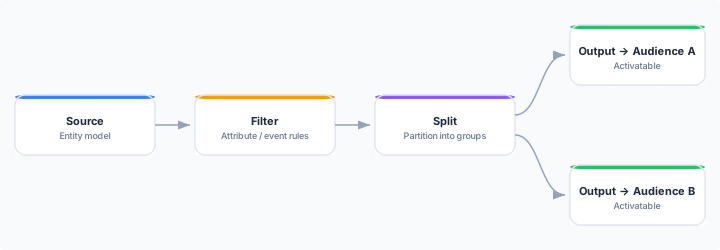
The Audience Canvas is a visual, drag-and-connect workspace for composing a family of related audiences in one place. Where the standard audience builder produces a single audience from one set of rules, the canvas lets you build multiple audiences as a flow diagram — applying shared filters once, then branching, splitting, ranking, and capping into many activatable outputs.
When to use the Canvas
| Situation | Use |
|---|---|
| A single, self-contained audience defined by one set of rules | Standard audience builder |
| Multiple related audiences that share common upstream logic | Audience Canvas |
| Splitting a population into mutually exclusive groups (A/B, value tiers) | Audience Canvas |
| Ranking and capping an audience (e.g. top 10,000 by predicted spend) | Audience Canvas |
| Reviewing audience composition visually with stakeholders | Audience Canvas |
Both kinds of audience coexist in your workspace. Existing standard audiences are unaffected when you create a canvas.
How it works
A canvas is a directed acyclic graph (DAG) of connected nodes. You add nodes from the palette, connect them, and configure each in the inspector panel on the right. Data flows from entry nodes toward one or more Output nodes — each Output becomes a distinct, named, activatable audience.
Entry nodes
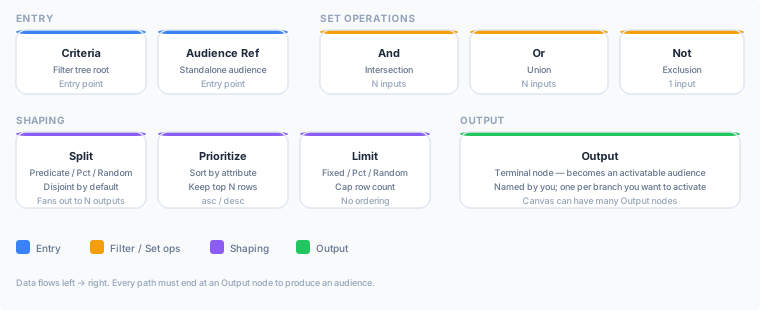
A canvas starts from one or more entry nodes. There is no separate Source node to add — the entity model you select when creating the canvas is implicit.
- Criteria — an inline filter tree, equivalent to a standalone audience filter. Use this as your main entry point when you want to define root conditions directly on the canvas.
- Audience Reference — pulls an existing standalone audience into the graph as a starting set. Useful when you want to compose on top of an audience you already maintain elsewhere.
Processing nodes
Between entry and output you can chain any combination of:
- Criteria (mid-pipeline) — when a Criteria node has an upstream connection it acts as a filter on the incoming set, AND-applying its rule tree (same rule editor as the standard audience builder). The same node type that defines entry conditions also narrows sets mid-pipeline.
- And / Or / Not — combine multiple upstream sets: intersection, union, or exclusion.
- Split — partitions the incoming set into labelled branches by predicate, percentage (hash-stable across runs), or random sampling. Branches are disjoint by default.
- Prioritize — sorts the incoming set by a chosen attribute (ascending or descending) and retains the top N rows.
- Limit — caps the set to a fixed count, a percentage, or a random sample.
Output nodes
Each Output node is a terminal node. You give it an audience name and it becomes a distinct, activatable audience that you can sync to destinations or use in journeys — exactly like any other audience.
Prerequisites
- At least one entity type defined in your data model.
- A connected warehouse with accessible tables.
- Optionally, computed attributes — canvases are most powerful when you filter and rank on computed attributes.
Key concepts
Canvas-owned audiences. Audiences produced by a canvas are owned by that canvas. Their definitions are read-only on the audience detail page; open the canvas to change them. Because the canvas is the single source of truth, editing an upstream node and republishing updates every audience that depends on it at once.
Draft and published state. Your in-progress edits are saved as a draft automatically. Live audiences are not affected until you click Publish. Every publish creates an immutable version snapshot, so you can roll back to any previous state.
Identity graph and confidence. When you create a canvas you can optionally attach an identity graph and set a minimum confidence threshold. This applies to all audiences produced by that canvas, so you configure cross-device resolution once rather than per-sync.
Next Steps
- Building your first canvas — step-by-step walkthrough from creation to publish
- Node reference — fields and options for every node type
- Publishing, versions & rollback — how drafts, diffs, and version history work
- Canvas-owned audiences — how canvas-owned audiences behave on the Audiences list and in pickers
- Audiences — the standard single-audience builder
- Syncs — activate an audience to a destination