Salesforce Marketing Cloud Personalization
Sync customer data to Salesforce Marketing Cloud Personalization (formerly Interaction Studio / Evergage) for real-time 1:1 personalization, recommendations, and machine-learning models. Zeotap pushes user profile attributes and behavioral / order events from your warehouse into Personalization through its server-side Event API.
Not the same as Salesforce Marketing Cloud (Engagement). Personalization is a distinct Salesforce product with its own host (
*.evergage.com), its own authentication (API tokens over HTTP Basic), and its own API surface (the Event API). If you want to sync Data Extensions, Journeys, Triggered Sends, or MobileConnect audiences, use the Salesforce Marketing Cloud destination instead.
Prerequisites
- A Marketing Cloud Personalization (Interaction Studio) account with an active dataset
- Administrator access to create an API Token in the Personalization UI
- Your account, pod, and dataset identifiers (from the Gears menu / account URL)
- The user identity you sync on (
user_id) must match the identity attribute configured in your dataset’s Identity settings
Authentication
Personalization uses API Tokens over HTTP Basic authentication. A token is a pair — an API Key ID (used as the Basic username) and an API Secret Key (used as the Basic password). There is no OAuth flow.
- Log in to Marketing Cloud Personalization
- Open the Gears menu (top-right) and go to Settings → API Tokens
- Click Create Token, give it a descriptive name (e.g. “Zeotap Integration”), and ensure it is permitted to send events
- Copy the generated API Key ID and API Secret Key (the secret is shown only once)
- From the Gears menu, note your account, pod, and dataset. These are visible in your Personalization URL — for
https://demo.us-1.evergage.com, the account isdemoand the pod isus-1 - In Zeotap, create a new Salesforce Marketing Cloud Personalization destination and paste the API Key ID, API Secret Key, account, pod, and dataset
Note: Zeotap constructs the API base URL as
https://{account}.{pod}.evergage.com. If your endpoint differs, use the optional Endpoint Base URL override.
Configuration
| Field | Type | Required | Description |
|---|---|---|---|
| API Key ID | Text | Yes | The API Key ID, used as the HTTP Basic username. |
| API Secret Key | Password | Yes | The API Secret Key, used as the HTTP Basic password. |
| Account | Text | Yes | Your Personalization account identifier (e.g. demo). |
| Pod / Instance | Select | Yes | Your Personalization pod / region. Pick from the list (e.g. us-1, germany-2, australia-3), or enter a custom value if your instance isn’t listed. |
| Dataset | Text | Yes | The dataset identifier that events are sent to. |
| Endpoint Base URL | Text | No | Advanced — full base URL override (e.g. https://demo.us-1.evergage.com). When set, account and pod are ignored for URL construction. |
Target Settings
| Field | Type | Required | Description |
|---|---|---|---|
| Object Type | Select | Yes | What to sync: User Profile (upsert contact attributes) or Event (append behavioral / order interactions). |
| Event Name (Action) | Text | Conditional | The default event action name used when a row does not map its own action field (required for Event). |
Supported Operations
Sync Modes
| Mode | Supported |
|---|---|
| Upsert | Yes |
| Insert | Yes |
| Update | — |
| Mirror | — |
User Profile syncs upsert attributes onto the matched profile. Events are append-only — each row sends one immutable event, so Insert and Upsert behave identically and there is no Update or Mirror.
Audience Sync Modes
| Mode | Supported |
|---|---|
| Add | — |
| Remove | — |
| Mirror | — |
| Upsert | — |
Personalization has no REST endpoint for segment / audience membership — segments are computed inside Personalization, and externally-computed membership can only be imported via SFTP ETL feeds. Audience membership sync is therefore not supported by this connector. See Limitations.
Features
- Field Mapping: Yes
- Schema Introspection: No — Personalization user attributes are freeform, so fields are mapped manually.
Required Mapping Fields
| Object Type | Required Fields | Purpose |
|---|---|---|
| User Profile | user_id | The Personalization user identity used to look up or merge the profile |
| Event | user_id | The user identity the event is attributed to |
For events, the event action name comes from a mapped action field or, if unmapped, from the Event Name (Action) target setting.
Default Destination Fields
User Profile
user_id, emailAddress, firstName, lastName, phone, city, country
Event
user_id, action, itemAction, itemId, itemType, orderId, price, quantity
Map itemType to your catalog object type (e.g. Product) whenever you send itemId or orderId — it names where the item and order data is stored in Personalization. Fields other than these land on the user’s profile as attributes.
How It Works
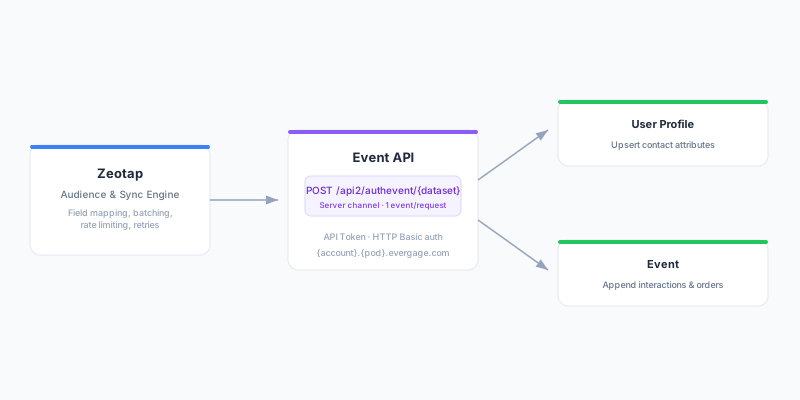
Zeotap reads rows from your model query, applies field mapping, and sends each row to the Personalization Event API (POST /api2/authevent/{dataset}, the authenticated server-side endpoint) over a trusted Server channel, authenticated with your API token via HTTP Basic. The Event API accepts one event per request, so rows are sent individually with automatic retry on rate-limit (HTTP 429) and server (5xx) responses.
User Profile
Each row is sent as an event carrying user.id and a user.attributes object built from all mapped non-identity fields. Personalization uses identity resolution to look up an existing profile and merges the attributes, or creates a new profile if none matches. Use this to enrich Personalization profiles with warehouse attributes (loyalty tier, lifetime value, preferences, etc.). Because a profile enrichment is not a real user interaction, the update is sent as non-interactive — it won’t register a visit or affect behavioral timing for the user.
Event
Each row is sent as an event with the resolved action name and a source.channel of Server. If mapped, itemAction (e.g. View, Add to Cart, Purchase) is included on the event. Item and order fields are nested under your catalog object type — taken from the mapped itemType (e.g. Product): itemId becomes the catalog item’s identifier, and for purchases orderId, price, and quantity populate the order and its line item. Any other mapped fields are sent as user.attributes. Because the catalog object type names where item and order data lands, itemType is required whenever you map itemId or orderId. Events are append-only and immutable — they feed Personalization’s behavioral models and campaign decisioning.
Rate Limits
Personalization enforces an account-level aggregate event-rate cap across all channels and users. Zeotap sends events sequentially and automatically retries after a backoff on HTTP 429 (honoring Retry-After) and 5xx responses. For very large one-time backfills, consider Personalization’s SFTP ETL feeds instead of the Event API.
Limitations
- Catalog (Products, Articles, Categories, Promotions, custom objects) and segment / audience membership are loaded into Personalization via SFTP ETL feeds (CSV), not the Event API. These are not supported by this connector — load them through Personalization’s Feeds Dashboard.
- The Event API sends one event per request; there is no bulk array endpoint. Very high-volume backfills are better served by ETL feeds.
Best Practices
Use a stable user identity
Map user_id to a stable, globally unique identifier that matches your dataset’s configured identity attribute (e.g. a hashed email or warehouse customer ID). Unstable identifiers create fragmented or duplicate profiles.
Keep attribute names consistent
Personalization attributes are freeform and case-sensitive. Use consistent attribute keys across syncs so downstream campaigns and models reference the same fields.
Choose the right object type
Use User Profile for slowly-changing attributes (profile enrichment, CDC-style upserts) and Event for behavioral signals and orders. Events are immutable, so send them append-only rather than trying to “update” a past event.
Scheduling
Schedule User Profile syncs based on how often the underlying attributes change (daily is typical). For time-sensitive behavioral events (abandoned cart, recent purchases), shorter intervals make sense.
Troubleshooting
Authentication failed (HTTP 401 / 403)
Verify the API Key ID and API Secret Key. Confirm the token still exists in Settings → API Tokens and is permitted to send events. If the token was rotated, update the credentials in Zeotap.
Wrong account, pod, or dataset
If requests fail to reach Personalization or events land in the wrong place, double-check the account, pod, and dataset against your Gears menu URL (https://{account}.{pod}.evergage.com). If your endpoint is non-standard, set the Endpoint Base URL override.
Events not appearing in Personalization
Confirm the user_id matches the identity attribute configured in your dataset’s Identity settings. Events with an unrecognized identity may create shadow profiles that are not visible where you expect. Also verify the dataset is active and accepting server-side events.
Profiles not merging as expected
Personalization merges profiles by identity resolution. If attributes land on separate profiles, your user_id values likely don’t align with the dataset’s primary identity attribute. Align the mapped identity with the dataset configuration.
Rate limiting (HTTP 429)
Zeotap automatically retries after a backoff when it receives a 429. If you consistently hit limits, reduce sync frequency or size, spread large syncs across off-peak windows, or use SFTP ETL feeds for bulk backfills.
Need to sync catalog or segment membership
These are SFTP ETL-only in Personalization and are not handled by this connector. Load catalog objects and externally-computed segment membership through Personalization’s Feeds Dashboard (CSV over SFTP). See Limitations.