Generic HTTP Push
The Generic HTTP Push loader receives events over HTTP instead of pulling from a source on a schedule. Your application posts JSON events to a Zeotap endpoint, and each event is durably captured and loaded into your warehouse — no polling, cron schedule, or source API required.
Use it when you control the producer and want to stream your own events (product analytics, server-side signals, webhooks from other systems) directly into Zeotap with a simple HTTP call.
When to Use It
- You own the system generating the data and can make an outbound HTTP request from it.
- You want push-based, near-real-time ingestion rather than a scheduled pull.
- Your payloads are freeform JSON whose shape may vary between events.
- You are forwarding webhooks from another platform into your warehouse.
For pull-based ingestion from a SaaS API or database on a schedule, use one of the other loaders instead.
How It Works
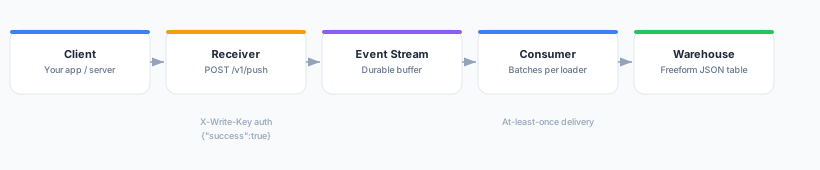
- Your client sends a
POSTrequest with a JSON event to the receiver, authenticating with a write key. - The receiver durably accepts the event and immediately responds with
{"success":true}. - Accepted events are buffered on a durable event stream, tagged with the loader they belong to.
- An always-on consumer batches events per loader and loads them into that loader’s configured warehouse.
Because the receiver acknowledges only after the event is durably stored, a success response means the event will be loaded — you do not need to keep it yourself once acknowledged.
Prerequisites
- A connected warehouse to load events into (BigQuery, Snowflake, Databricks, or ClickHouse).
- A system that can make an outbound HTTPS request with a JSON body.
Create the Loader
- In Zeotap, go to Loaders and click Add Loader.
- Choose Generic HTTP Push.
- Select the Target Warehouse and Schema where events should land.
- Optionally set a Target Table name (defaults to
events). - Save the loader.
| Field | Required | Description |
|---|---|---|
| Target Warehouse | Yes | The warehouse source that received events are loaded into. |
| Schema | Yes | The schema/dataset that holds the events table. |
| Target Table | No | The table name events land in. Defaults to events. |
Mint a Write Key
Requests authenticate with a write key — a per-loader credential you manage in the UI.
- Open your Generic HTTP Push loader.
- Go to the Write Keys section and click Create Write Key.
- Copy the generated key and store it in your application’s configuration.
Write keys are public identifiers (Segment-style): they identify which loader an event belongs to and authorize writes, but they are not secrets that unlock reads. It is safe to embed them in server-side producers. You can create multiple keys per loader (for example, one per environment or service) and revoke any key at any time from the same screen. Revocation takes effect within a few minutes (the receiver briefly caches key lookups).
Sending Events
The receiver exposes two endpoints.
| Endpoint | Body | Use |
|---|---|---|
POST /v1/push | A single JSON event object | Send one event per request. |
POST /v1/push/batch | A JSON array of events, or an object {"batch":[...]} | Send many events in one request. |
Authentication
Send your write key with every request. Three options are accepted, in this order of convenience:
X-Write-Keyheader (recommended) —X-Write-Key: <write-key>- HTTP Basic Auth — the write key as the username, with an empty password.
writeKeyquery parameter —?writeKey=<write-key>(useful where custom headers are hard to set).
Single event
curl -X POST https://composable.zeotap.com/v1/push \
  -H "X-Write-Key: YOUR_WRITE_KEY" \
  -H "Content-Type: application/json" \
  -d '{
    "event": "product_viewed",
    "user_id": "u_123",
    "properties": {
      "sku": "ABC-001",
      "price": 29.99
    }
  }'
Response:
{ "success": true }Batch of events
Send a JSON array:
curl -X POST https://composable.zeotap.com/v1/push/batch \
  -H "X-Write-Key: YOUR_WRITE_KEY" \
  -H "Content-Type: application/json" \
  -d '[
    { "event": "product_viewed", "user_id": "u_123" },
    { "event": "product_added", "user_id": "u_123" }
  ]'
Or wrap the events in a batch object:
{
  "batch": [
    { "event": "product_viewed", "user_id": "u_123" },
    { "event": "checkout_started", "user_id": "u_123" }
  ]
}
The batch endpoint returns the number of events durably accepted:
{ "success": true, "received": 2 }If some events in the batch could not be accepted, the response still returns HTTP 200 with success: false and an errors array describing the failures, alongside the received count of those that succeeded. Retry the failed events.
How Data Lands in the Warehouse
Events are loaded as freeform JSON — the loader does not require or enforce a schema, so producers can evolve their payloads freely. Each event becomes one row with a fixed set of columns:
| Column | Description |
|---|---|
loader_id | The loader the event was sent to (derived from the write key). |
message_id | A unique identifier for the event. |
workspace_id | The workspace that owns the loader. |
received_at | The time the receiver durably accepted the event. |
payload | The complete JSON body you posted, stored as JSON. |
Your event’s own fields live inside payload. Extract them downstream in a model using your warehouse’s JSON functions — for example, in BigQuery:
SELECT
  message_id,
  received_at,
  JSON_VALUE(payload, '$.event')            AS event,
  JSON_VALUE(payload, '$.user_id')          AS user_id,
  JSON_VALUE(payload, '$.properties.sku')   AS sku
FROM events   -- your loader's target table (default: events)
Delivery Semantics
Delivery is at-least-once. Every acknowledged event is guaranteed to reach the warehouse, but under retries or transient failures the same event may occasionally be loaded more than once.
- Producers should retry on network errors or non-
2xxresponses. A retry after a request that actually succeeded is safe — it may simply produce a duplicate row. - De-duplicate downstream if you need exactly-once semantics. Send a stable identifier in your payload (for example an
event_id) and deduplicate on it in a model, or usemessage_idtogether with your own key. - Do not treat a missing response as a failure to store — retry, and reconcile duplicates later rather than dropping events.
Troubleshooting
| Issue | Resolution |
|---|---|
401 Unauthorized | The write key is missing, malformed, or revoked. Confirm you are sending it via X-Write-Key, Basic Auth username, or ?writeKey=, and that the key is still active. |
400 Bad Request | The body is not valid JSON, or a batch request was not an array or {"batch":[...]} object. Check the Content-Type is application/json and the payload parses. |
413 Payload Too Large | A single event exceeds 1 MB, or a batch exceeds 10 MB. Split large payloads into smaller batches. |
| Events accepted but not in the warehouse yet | Loading is batched, so there is a short delay between acknowledgement and the row appearing. Confirm the loader’s target warehouse and schema are correct. |
| Duplicate rows | Expected under at-least-once delivery. Deduplicate downstream on a stable payload identifier or message_id. |
Next Steps
- Create a Model over the loaded events table.
- Build an Audience from the modeled data.